What's new.
New features, improvements, and fixes. Stay updated with our latest releases.
April 29, 2026
Send files in chat—and see them clearly in email
Your team can receive files from customers in the conversation flow. Unsafe or unsupported file types are turned away, and risky files can be blocked before they ever reach your agents—so you get the convenience of attachments without opening the door to junk.
- Plans: Your plan controls whether file uploads are available for your workspace.
- Email: When you reply by email, you get a clearer preview of drafts and of what the customer attached, so you are not guessing from a blank thread.
April 22, 2026
Big websites, clearer limits—and smoother helpdesk handoffs
If you connect a large site, it is easier to stay within your crawl allowance and to page through long lists of URLs instead of loading everything at once.
- Freshdesk and Freshchat: Chats that move to your helpdesk should feel more consistent—messages and internal notes land in a cleaner shape for your agents.
- Plans & billing: A few rough edges around product names and how many email sending domains you can use are smoothed out so setup matches what you expect.
April 14, 2026
Visitors can send photos in the web chat
For chat on your website, you can turn on image uploads so people can send a screenshot or a photo of a product issue. The assistant can use what is in the image when you enable this—otherwise everything stays text-only, as before.
- Your choice per agent: Turn image uploads on only where it makes sense.
- Smarter models: If you use a model that "thinks" a bit longer before answering, the widget can reflect that so the experience does not feel stuck.
April 9, 2026
Get nudged when someone really needs your team
While you are in the dashboard, you get timely heads-ups when support work needs attention—so you are less likely to miss a handoff or a new ticket.
- Alerts when a customer asks for a human, when a new ticket is created, when a ticket is reopened, when someone is assigned, or when a ticket is created by hand.
- Notifications stay reliable even when your account is busy behind the scenes.
March 24, 2026
Live chat and search that hold up under load
We strengthened how live updates (who is online, new messages, handoffs) are delivered so busy teams see fewer missed or delayed updates.
- Knowledge from your site: The assistant can pull slightly richer context from the exact help article or page that matched a question.
- Finding old chats: Search is pickier in a good way—very short searches are less likely to surface random unrelated conversations.
March 20, 2026
Website sources that update themselves with less busywork
When you refresh a website knowledge source, we can follow links and pick up related pages so you spend less time adding every URL by hand.
Large syncs are handled in a steadier way, so big sites are less likely to get stuck halfway when you import or refresh content.
March 13, 2026
Email campaigns—and keep contacts tidy
Email campaigns let you reach your audience with personalized sends, see how a run is progressing, and pick up more smoothly if something pauses mid-way. (Campaign sending is email-only for now.)
- WhatsApp (chat & messaging): Use approved message templates, connect more than one business number where you need them, and see when a number is healthy and ready for conversations—not bulk campaign blasts.
- Contacts: Merge duplicates, undo a merge if you made a mistake, delete in bulk, export to CSV, and store extra fields you care about—with checks so bad data does not slip in.
- Your product on the web: Safer defaults for which websites can talk to your account from the browser.
You can also style the emails customers get when a ticket is opened or when an agent replies—so they look like your brand, not a generic system message.
February 26, 2026
One view of who you are talking to—on WhatsApp or email
Chats that start on WhatsApp or over email now tie to the same contact profile when possible, so your team sees one story instead of scattered threads.
- WhatsApp: See whether messages got through, quiet down old chats that went idle, and if no one is online to chat, turn the conversation into a ticket so the customer is still taken care of.
- Reliability: Connecting WhatsApp to Deflect should feel a bit more predictable day to day.
February 16, 2026
Clearer website import—and keep chat calm while tools run
For website sources, you get a clearer picture of what was imported, what was skipped, and you can search the list of crawled pages when you need to check a specific URL. After a sync, we can also ping search engines so new or updated pages are discovered faster.
- Better reading of your site: We read web pages in a way that tends to produce cleaner answers from your help content.
- Plans: Crawl allowances line up more clearly with what your plan includes.
- Chat (including the widget): While a custom tool runs in the background, you can set a short "one moment" style message so people in the thread are not left staring at silence.
February 12, 2026
Custom API Security & In-Dashboard Testing
Your custom API tool integrations are now protected by two new security layers, and you can test them directly from the dashboard before going live.
1. API Response Security Custom API functions now validate every response before it reaches the AI, ensuring your chatbot never processes unexpected or dangerous content.
- Content-Type Blocking: Only text and JSON responses are accepted. Binary files (PDFs, images, executables) are automatically blocked before any data is read.
- 50 KB Response Cap: Responses are streamed in chunks and capped at 50 KB to prevent abuse. Oversized responses are truncated gracefully so the AI still gets useful data.
- Accept Header: All outgoing API requests now include an `Accept` header signaling that only text/JSON is expected.
2. Test API — Try Before You Deploy A new Test API panel inside the Custom Function editor lets you validate your API configuration instantly — without saving or deploying.
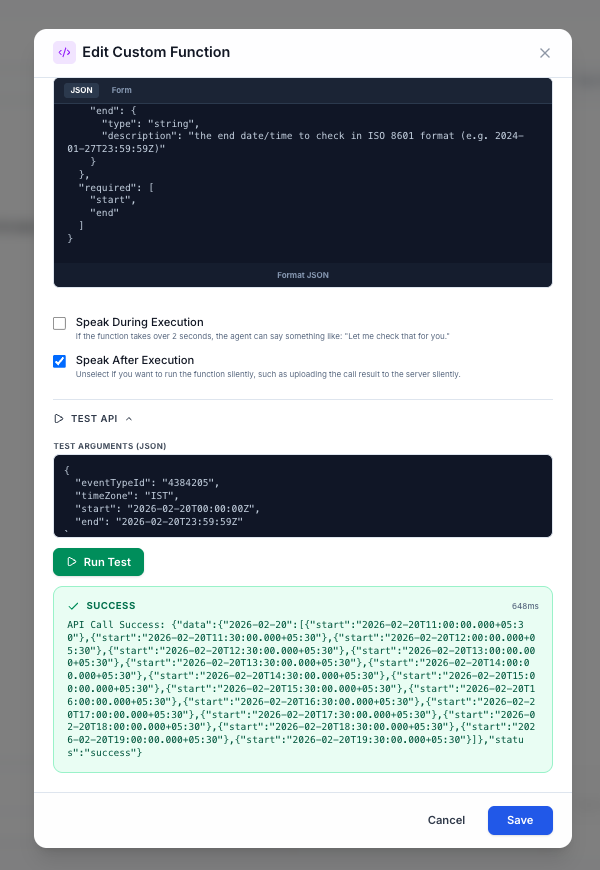
The Test API panel with auto-filled arguments and live results.
- Smart Auto-Fill: Test arguments are auto-generated from your query parameters and JSON schema. Required fields get type-appropriate placeholders, and `e.g.` hints from descriptions are extracted automatically.
- Live Results: See success/failure status, the full response body, and exact response time in milliseconds.
- Security in Action: Test results show the same security guards your live chatbot uses — blocked content types and truncated responses are clearly surfaced.
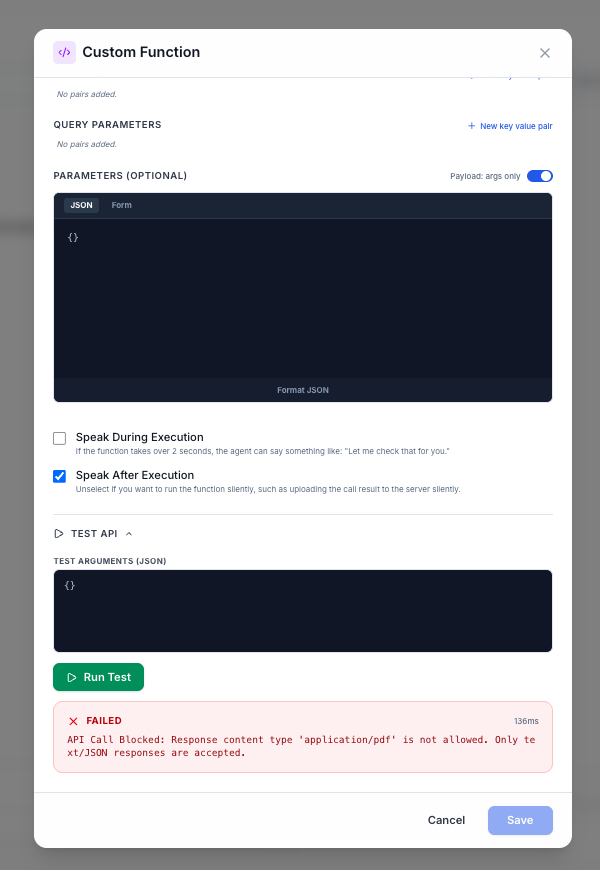
Security in action — a blocked binary download response.
February 4, 2026
Asynchronous Support with "Ticket Only" Mode
We’ve introduced Ticket Only mode, a new way to manage human support requests that gives your team total flexibility. Instead of forcing a live chat connection, you can now configure your AI agents to capture inquiries as structured tickets that your team can solve whenever they are ready.
1. Professional Lead & Context Capture When a user requests human help, the AI gracefully transitions into a ticketing flow. It intelligently asks for the user's email address and provides them with a unique Ticket ID (e.g., TKT-0001). This ensures your team has everything they need—including the full chat transcript—to resolve the issue via email later.
- Automated Lead Capture: When human agents are unavailable, the AI intelligently switches to a 'Ticket Only' flow, asking for the user's email to follow up.
- Instant Ticket Creation: Once an email is provided, the system automatically converts the chat into a ticket with a unique ID (e.g., TKT-0001).
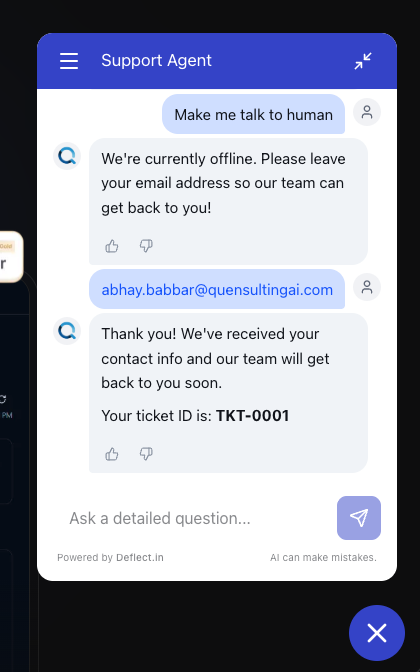
The widget seamlessly captures user contact info and provides a Ticket ID for follow-up.
2. Smart Availability & Scheduling You no longer have to worry about "missed chats" when your team is away.
- Always Available: Perfect for teams who prefer solving issues instantly.
- Scheduled Schedule: Define your business hours and timezone; the AI will automatically switch to Ticket mode when you're offline.
- Ticket Only: A simple toggle to instantly move all human handoffs to the ticketing system.
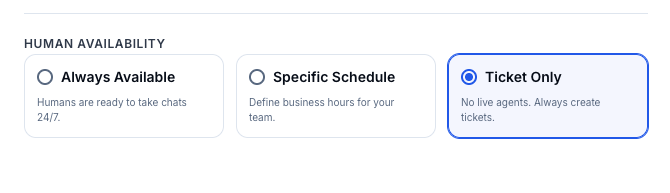
Enable "Ticket Only" mode
3. Reduced Pressure, Better Support This update is designed to bridge the gap between AI automation and human expertise. By moving to an asynchronous model, your team can manage their support queue at their own pace without the pressure of being "always online" for live chats, while your customers still receive a professional and guaranteed path to resolution.
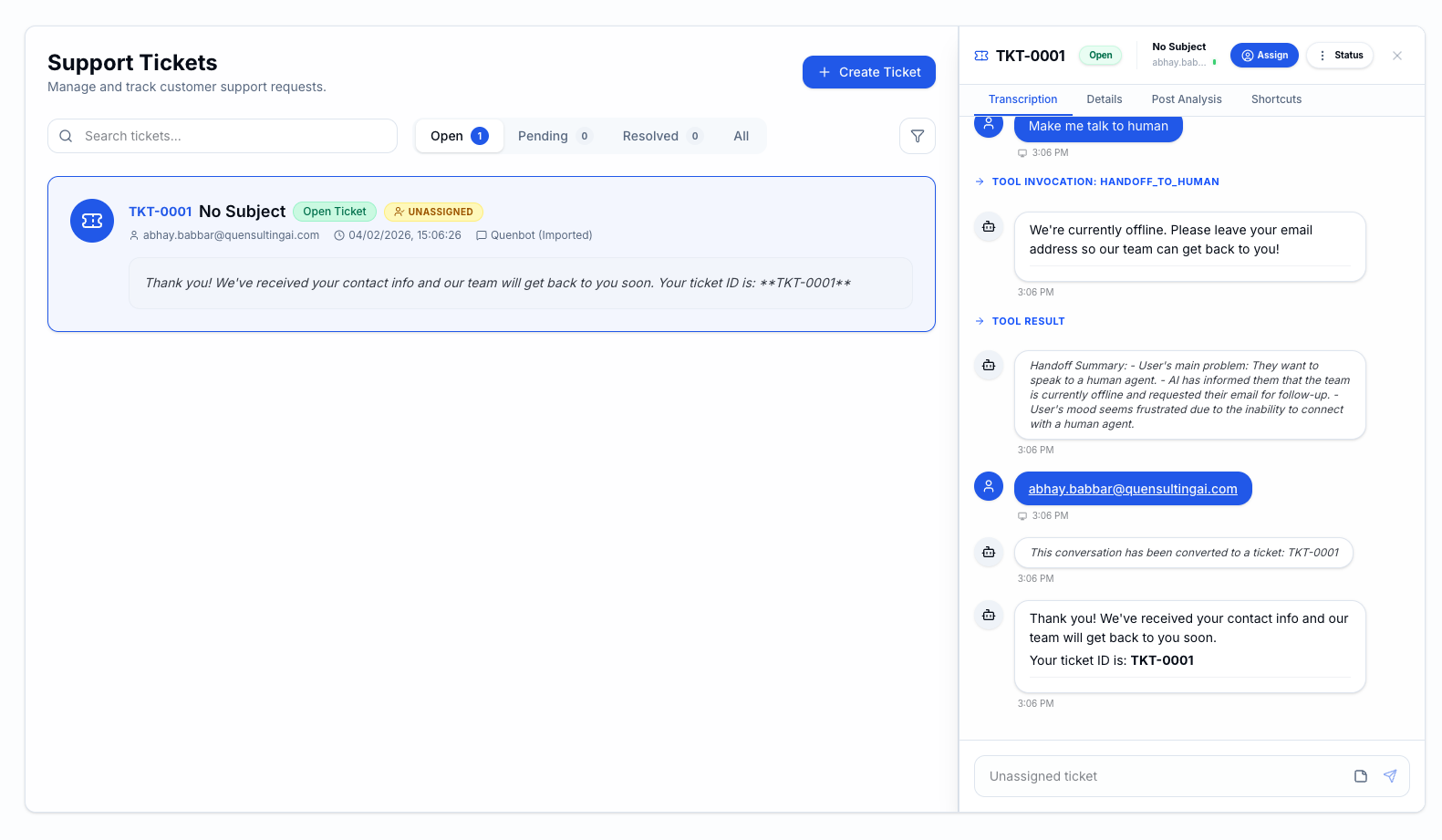
Every offline request is automatically converted into a structured ticket with a unique ID, ensuring your team has the full context needed for follow-up.
February 3, 2026
🚀 Widget Update: Real-time Streaming & Intelligent Status
We have significantly improved the user experience of the chat widget by making the AI's "thought process" transparent and delivering responses word-by-word. 1. Granular Processing Status Instead of a generic typing indicator, users now see exactly what the AI is doing in real-time. This transparency reduces perceived latency and provides immediate feedback after a message is sent.
- Rewriting Query: Shown when the AI is analyzing conversation history to understand the user's intent better.
- Fetching Content: Shown when the system is actively searching the knowledge base for relevant documents.
- Generating Answer: Shown just as the LLM begins to formulate the final response.

GIF showing the new widget with real-time streaming and intelligent status.
2. Word-by-Word Streaming Responses are now delivered word-by-word as they are generated. This allows users to start reading the answer immediately, making the widget feel significantly faster and more interactive compared to waiting for the full block of text.
3. Intelligent Auto-Scrolling The chat window now intelligently follows the AI's output to ensure the user never loses their place.
- Adaptive Scrolling: We've implemented high-performance "instant" scrolling during streaming to ensure the latest text is always in view without animation lag.
- Smooth Transitions: Standard messages and human agent typing indicators still use polished smooth-scroll animations.
4. Cross-Platform Style Fixes We've resolved a critical CSS inheritance issue that affected the widget when embedded in dark-themed Next.js or Tailwind projects.
January 30, 2026
Automated Web Crawling & Scheduling
Keeping your AI's knowledge base up-to-date just got effortless. We've introduced a powerful Web Crawling engine that can ingest content from single URLs or entire sitemaps, complete with automated scheduling.
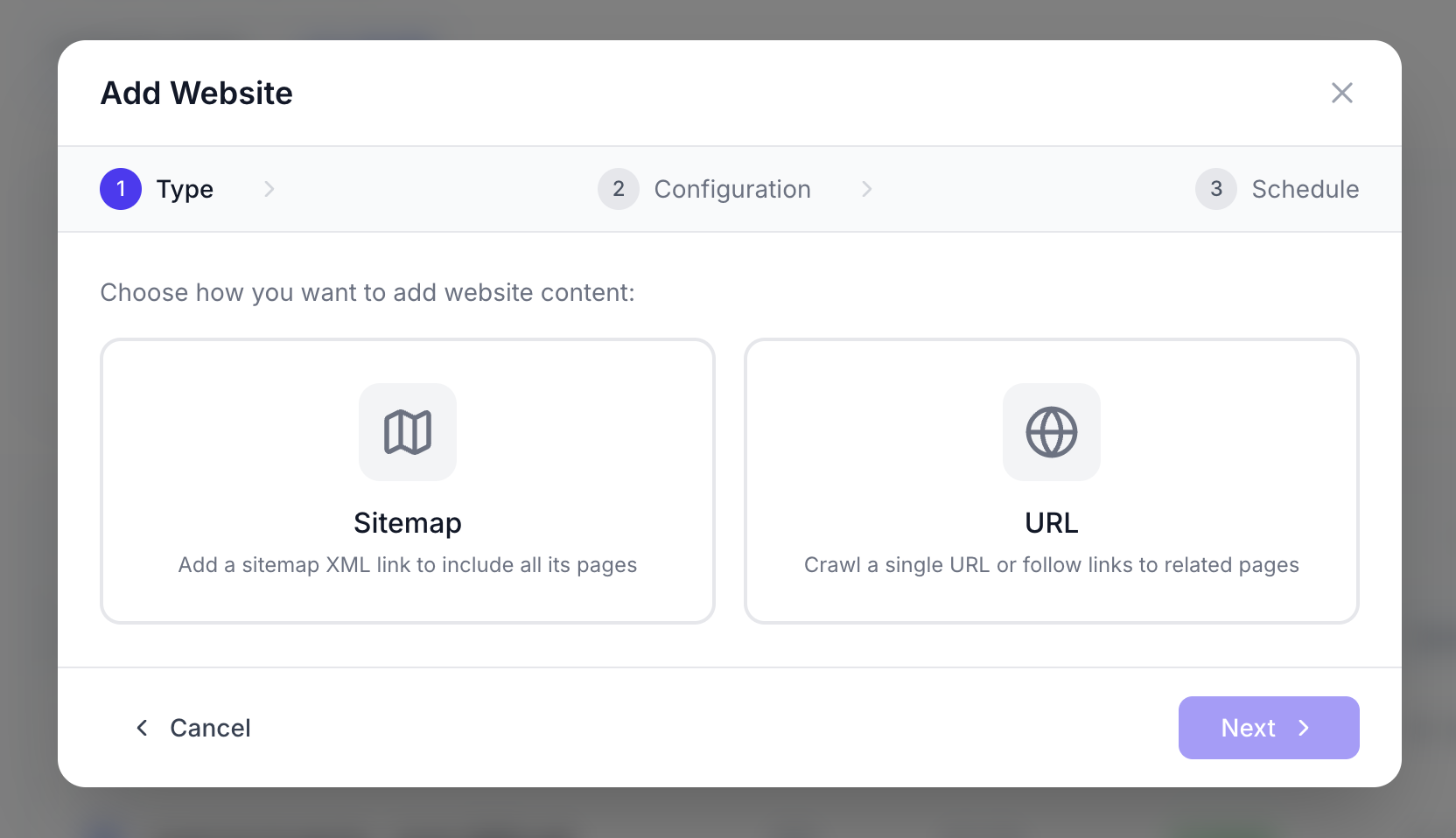
Manage all your web sources and their sync status in one place.
- Sitemap & URL Support: Point us to a single page or a full sitemap XML to instantly ingest hundreds of pages.
- JavaScript Rendering: Our crawler handles dynamic, JS-heavy websites to capture content that simple scrapers miss.
- Granular Control: Hand-pick specific pages to crawl or set up exclusion patterns to skip irrelevant sections (like /admin or /login).
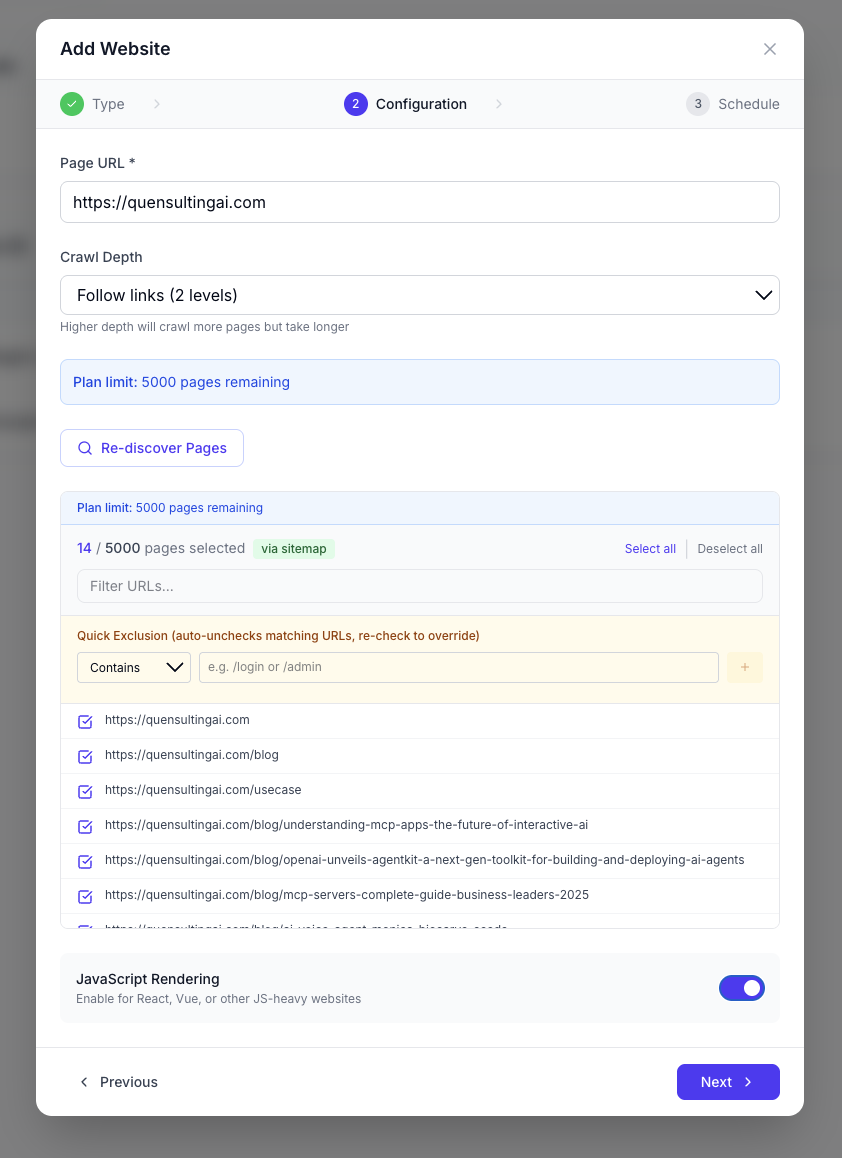
Select only the pages you want
- Auto-Sync Schedules: Set your sources to refresh Daily, Weekly, or Monthly so your AI always answers with the latest information.
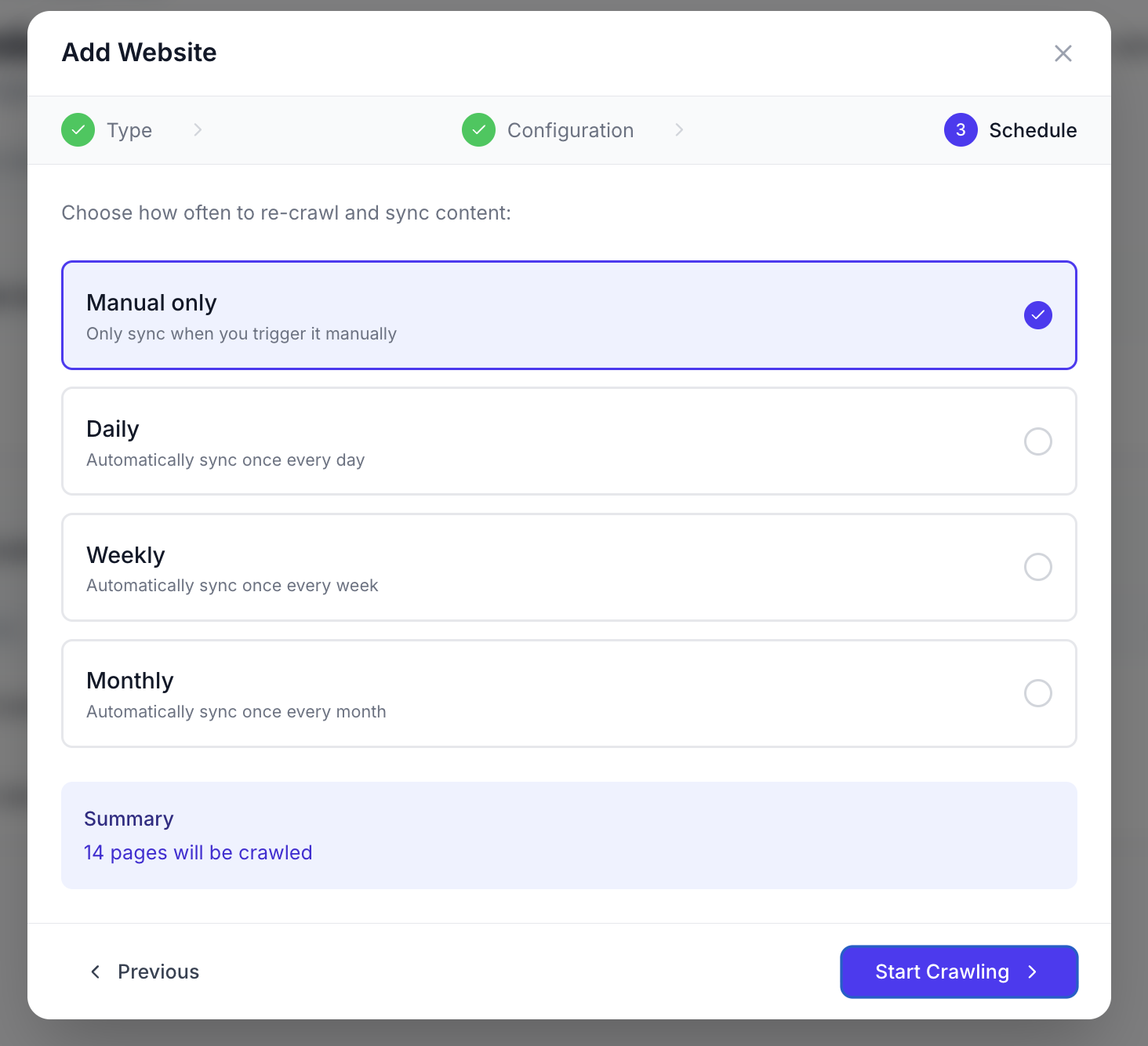
Easily configure sync frequency when adding a new source.
This update ensures your chatbot evolves alongside your website without any manual intervention.
January 23, 2026
Manage Agents Faster: Duplicate, Import, and Export
Managing multiple AI agents just got significantly easier. We've added three highly requested features to give you total control over your agent configurations.
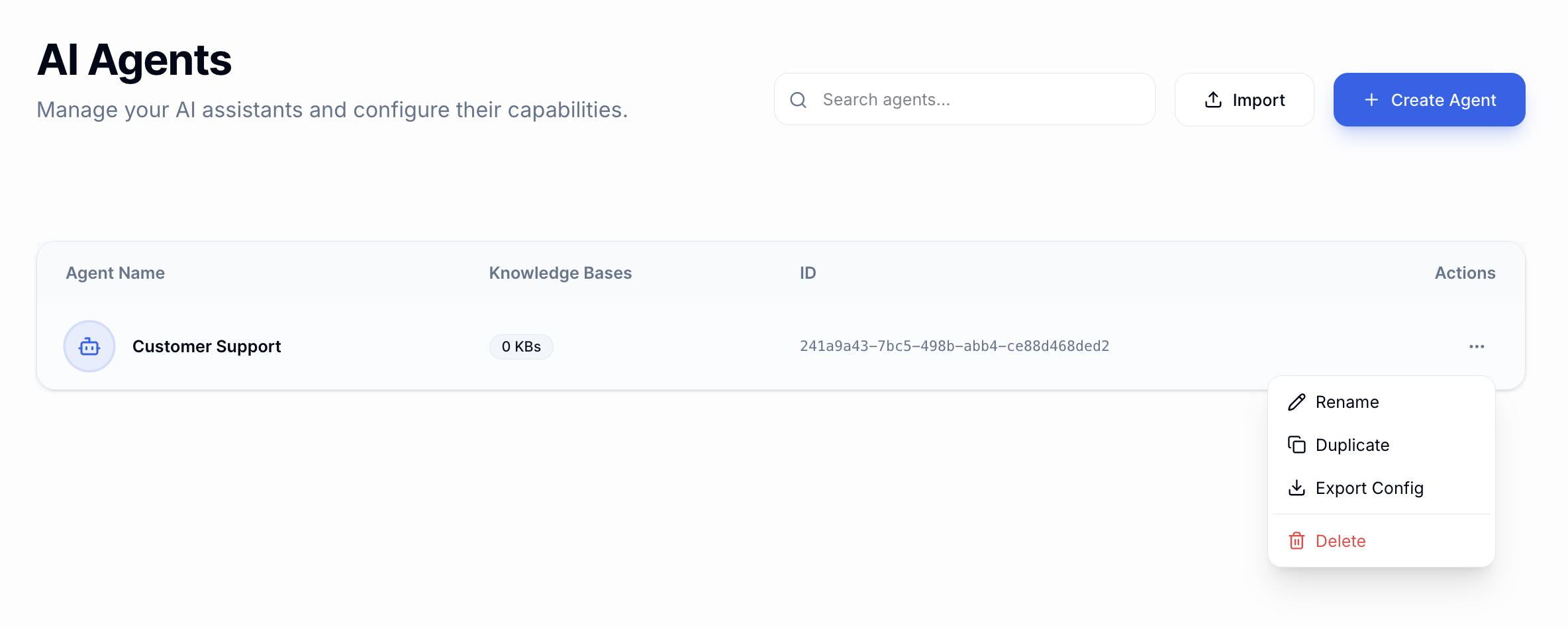
New management tools available in the Agent settings menu.
- One-Click Duplicate: Instantly clone an existing agent's settings, knowledge base, and personality to test new variations.
- Agent Export: Download your agent's configuration as a JSON file for backup or version control.
- Seamless Import: Move agents between different organizations or accounts by simply uploading an export file.
Whether you are scaling your support team or moving agents between environments, these tools will save you hours of manual setup.
January 20, 2026
Freshchat Integration
We are excited to announce our official Freshchat integration! You can now connect your Deflect AI agents directly to your Freshchat account to provide seamless, automated support across all your customer channels.
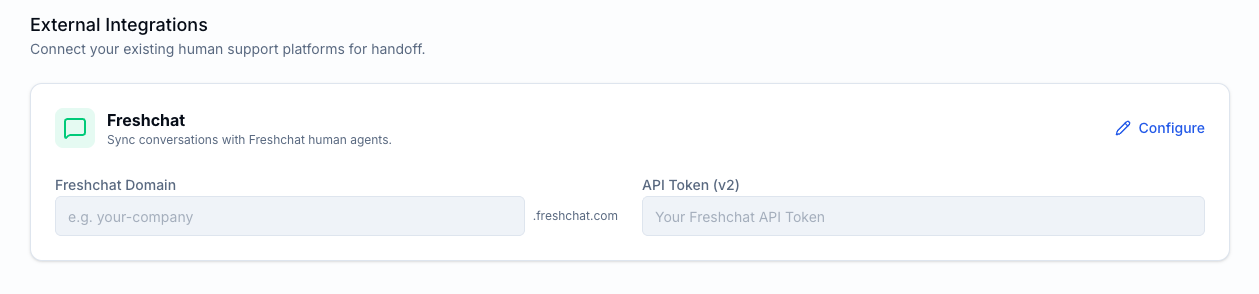
Easily connect your Freshchat account with a single API key.
- Intelligent handoff: AI handles the initial query and passes to a human agent in Freshchat when needed.
- Full conversation history preserved for human agents.
- Intelligent handsoff can be done within Deflect itself. This is just an addon integration for customers willing to stick to Freshchats
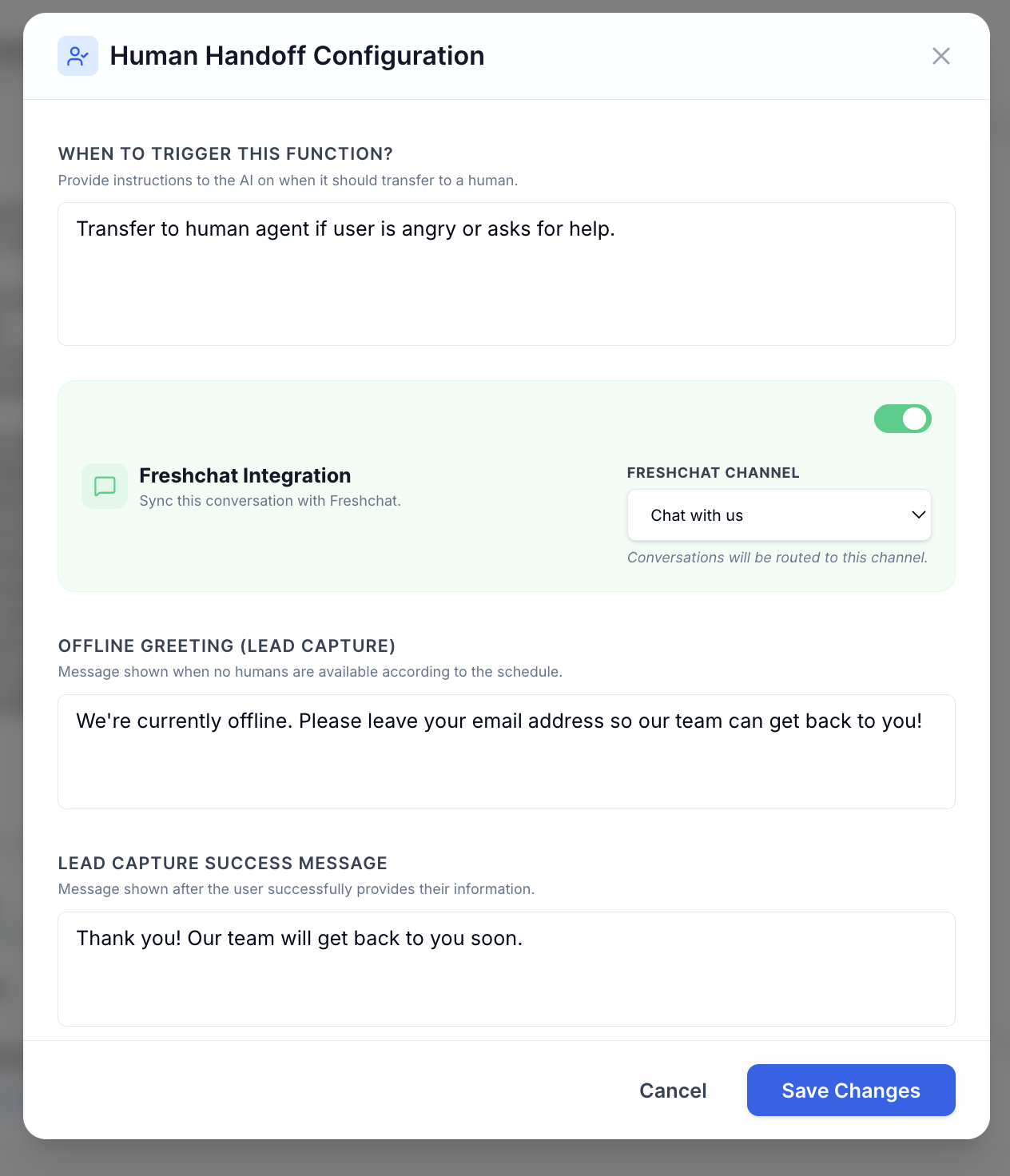
Turn on freshchat integration inside human handsoff of specific agent you want it for. Select the Freshchat channel where you want the chats to redirect
This integration ensures that your team stays in their preferred environment while leveraging the power of Deflect AI to reduce ticket volume.